
We use cookies to run this site, to understand how it's being used, and to measure our advertising. You can accept everything, reject everything that isn't strictly necessary, or decide for yourself. You can change your mind any time from the link in our footer.

We use cookies to understand how this site is used and to measure our advertising. You can change what you allow any time.

Free Tools

Test Your Website. Free. No Strings.

Nobody should have to rely on a web company's word about what they say they'll deliver, including ours – which is why we prove it. Every tool on this page measures your site against industry standards and metrics: Google's scoring curves, the W3C's accessibility rules, schema.org, and the robots standard, to name a few.

Our free audit gives you a quick snapshot of where your site stands (the check-up). From there, our deep audit gives you the precise action plan for fixing it (the diagnosis and the prescription).

No account, no email gate, no sales calls after. If these tools say your site needs a closer look, that is what we do: the full examination, the diagnosis, and the prescription you can act on. Give us a call. That conversation is free, too.

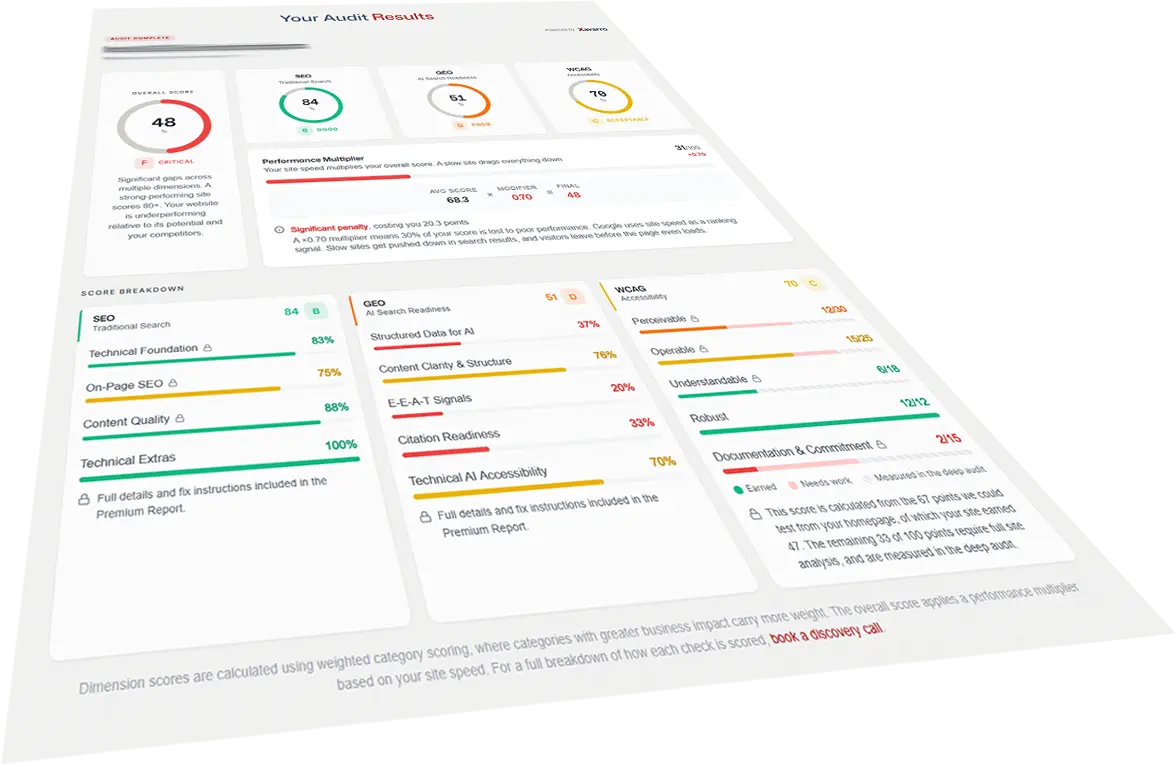
Website Intelligence Audit

Free, about 30 seconds

Score any website across four pillars: SEO, AI search visibility, accessibility, and performance. Category breakdowns, an overall grade, and mobile versus desktop performance.

Open the tool
Lighthouse Score Calculator

Free, interactive

See exactly how Google scores your site. Move the five performance metrics and watch the published curves, weights, and mobile versus desktop models decide the number. Then put your own traffic in and see what your load time costs you each month.

Open the tool

AI Search Visibility Check

Free, instant

Check whether your website blocks AI search crawlers and assistants like GPTBot, ClaudeBot, and PerplexityBot. Know if AI tools can even see your site.

Open the tool

WCAG 2.1 AA Contrast Checker

Free, interactive

Check any text and background pair against WCAG 2.1 at your actual text size and weight. One straight pass or fail with the required ratio, the way an accessibility review reads it.

Open the tool

Schema Markup Checker

Free, instant

See every schema.org entity your page declares in the HTML your server actually sends, broken markup included, and how many of the local business signals search engines and AI assistants look for the page carries.

Open the tool

SERP Snippet Preview

Free, instant

See how your page reads in a Google search result. Title and meta description measured against real scoring bands, canonical and robots checks, and how many of your social share tags are there.

Open the tool

NAP Consistency Checker

Free, two steps

Your website next to your Google Business Profile listing: name, address, phone and website as factual match or differs rows. Pick your listing, and the check runs against that one only.

Open the tool

JavaScript Rendering Check

Free, about 5 seconds

Your page loaded twice on our browser, with JavaScript off and on. See how much of the text a crawler that never runs JavaScript can read, measured against the same bands the audit scores with, and read exactly what it sees.

Open the tool

WordPress Exposure Check

Free, about 5 seconds

Every WordPress site has the same handful of doors. See which of yours are open, from XML-RPC and username listing to public logs, leftover files, headers and HTTPS, graded on the same scale as the audit. Passive: ordinary requests only, never a login attempt.

Open the tool

Questions About the Free Tools

What they read, what they keep, and where the deep audit begins.

Are these tools really free?
Yes. No account, no email address, no trial clock. Every tool on this page runs in full for anyone who opens it. They are the checks we run on our own work, and we would rather you see the numbers than take our word for it.
Which tool should I start with?
If you want the whole picture of one page, start with the free Website Intelligence Audit: it scores SEO, AI search, Accessibility and Performance in about 30 seconds. The single tools are for a single question. Wondering how your listing reads in Google? The snippet preview. Not sure your grey text passes? The contrast checker. Each one answers one thing, and answers it plainly.
What is the difference between these tools, the free audit and the deep audit?
A single tool reads one signal on one page and tells you whether it is there and how much of the page it affects. The free audit reads one page across all four pillars and scores it. The deep audit reads up to 50 pages, scores every one, and hands you a prioritised action plan with the findings ranked by what to fix first, and how to fix it. Free tells you where you stand. The deep audit tells you what to do about it, in what order.
Why does a tool show something different from what I see in my browser?
The URL-based tools read the HTML your server sends, before any JavaScript runs, because that is what a crawler sees first. If your title, description or structured data is added by a script after the page loads, the tool will report it as missing, and so may the crawler. That difference is the finding. The JavaScript Rendering Check is the exception: it loads the page both ways and shows you the gap directly.
What do you store when I run a check?
The calculators run entirely in your browser and send nothing to us. The URL-based checks keep the address you entered and a non-identifying summary of what was found (finding codes, counts and lengths, never the page text) so we can see which checks people use and where they fail. We do not store your IP address. The NAP Consistency Checker also keeps the Google place ID of the listing you confirm. The NAP Consistency Checker, the JavaScript Rendering Check and the WordPress Exposure Check keep a salted, one-day hash of your IP for rate limiting only. The Rendering Check’s text sample and the Exposure Check’s file names are shown on screen and never stored. Details are in our Privacy Policy.
Can I run these on a client's site?
Yes. Every URL-based tool reads public pages the same way a search engine does, and nothing is stored beyond what is described above. Agencies and freelancers are welcome to use them on the sites they manage. The WordPress Exposure Check asks you to confirm you own the site or are authorized to test it, because a security check is something you run on your own property. If a check turns something up, that is what we do.